Friday, February 18, 2011

Are Your Search Results Protected?


Over the last two weeks I've talked about the importance of backing up your memories and locking down your credit. Both topics deal with protecting those things that are personal to you. So today's focus is on protecting your search results. In a digital world you would be amazed at the amount of information someone could compile off of your internet habits. Your search results could tell a story that would revival the work of an FBI profiler. I know you may think I have nothing to hide, but that doesn't mean your online life has to be an open book.

This is where StartPage comes in. StartPage is provided by Ixquick (overseas version) and it allows you to search the internet in total anonymity. They do not record your IP address, use cookies or track your searches, and they're the first search engine to do so. If you're not familiar with IP addresses to a computer it's just like your phone number showing up on a caller ID. Most search engines record all this information so they can target you with advertising and other things, but most importantly all this information is stored on their computers. This puts your personal life in the hands of others.

StartPage saves you time by searching the most popular search engines simultaneously and anonymously. They provide more comprehensive search results, advanced searches (Boolean logic, phrases, wildcards, and field searches) and global Internet searches providing you with business listings in the StartPage Phonebook. StartPage uses a star ranking system from 1-5 and  search result honing to help pinpoint the search results you want with either a check mark or an x. After finding a search term in StartPage you will have the option of going to the page directly, or using their proxy button underneath the results. This adds another layer of protection to your privacy.


To back all of this up StartPage was the first to receive European Privacy Seal Award in 2008 certifying their promise to protect their users privacy. So if you're serious about security and your personal information give StartPage a try. A big thanks to Dr. Katherine Albrecht U.S Contact for StartPage and a respected security advocate for allowing me to use the StartPage logo. When it comes to security remember it's better to be proactive than reactive.

Friday, February 11, 2011

DIY "Life Lock" Your Credit


If you watch TV I'm sure you've seen the Life Lock ads with the CEO publicly displaying his Social Security number for the world to see. Well even he had his identity stolen (13 times), but that doesn't have to be you. Credit monitoring is great, but in reality it is really not enough. What you should consider is locking your credit. Even if you don't believe your credit is worthy of locking down it's something you should give serious thought to. With bad credit someone could still open those small accounts like cell phones and utilities, or even worse just outright assume your identity and commit crimes in your name.


Every credit agency in the United States allows you to freeze your credit, and all this can be accomplished on-line. Freezing your credit prevents anyone from fraudulently using it, and if you need to apply for something it requires you to unfreeze it. Once frozen your credit can only be pulled by your existing accounts or credit collection agencies acting on the behalf of a company with your account. To freeze your credit your will have to fill out the necessary forms with each of the three reporting agencies Trans Union, Experian and Equifax (links at the bottom). It's necessary to do it with all three because credit agencies are not linked and what may show on one report may not show on another.

On average it will cost you anywhere from $20-$60 dollars to lock down your report at all three agencies (prices vary by state), That's a small price compared to the monthly fees most companies charge for monitoring your credit, and if someone tried to misuse your name by charging thousands of dollars.  Freezing your credit is the most effective way of protecting yourself because simply adding a statement or an alert to your credit profile isn't enough because computers don't look at these statements. For overseas users credit standards vary by country because of the different laws in each, but there is one more thing that anyone can do. 

I would recommend getting a Google Voice number and adding that number to your credit profile (or Skype number if outside the United States) and use this number when applying for credit. With Google Voice or Skype you can receive email messages saying you have a voice mail, but also with GV you can receive a text message too. And with both services you can forward calls to more than one phone. Fast notification is the most important thing if someone is trying rip you off. For more on Google Voice checkout my guest post at Infocarnivore and my past post on Skype. Remember its better to be proactive than reactive.


Friday, February 4, 2011

Time to Safeguard Those Memories


A few days ago I was reading the 24/7MoM via Blogengage and Heather was discussing her resent misfortune of a fire starting in her apartment building. She received water and smoke damage, which caused some damage to her computer. Now she's trying to see if it can be saved. Living in a digital age is great, but with so many of our memories today on a computer it can make you vulnerable to loss due to fire, viruses or hard drive failure. So today I want to remind you the importance of backing up your information, especially pictures! A lot of things can be replaced, but you can't replace the memories of your life and loved ones. But it's not just about backing up your data. If you have time scan the photos you don't have in digital form. This way if the unthinkable happens your prepared. If you don't have a scanner just go to Walmart and use their machine, or any drug store.

Now the next thing is accomplishing the task. Backup hard drive prices have really fallen in the past two years. Making it easy to store all your data. With the situation that happened to Heather however, unless you keep your backup drive in a safety deposit box it want do you any good if your house or apartment burns to the ground. I do recommend having one, just don't rely on it as your sole option. Below I've listed a few services I use that give you free storage up to a certain amount, but also have paid plans with reasonable prices. Storing your data securely off site is a must have in the digital age. So take some time this weekend to save the things that matter most. Remember its always better to be proactive, than reactive.


Dropbox 2GB Free (See previous post on uses for Dropbox)

Windows SkyDrive 25GB Free

ZumoDrive 2GB Free

IDrive 5GB Free

Friday, January 28, 2011

Personal Journaling made Easy with Ohlife


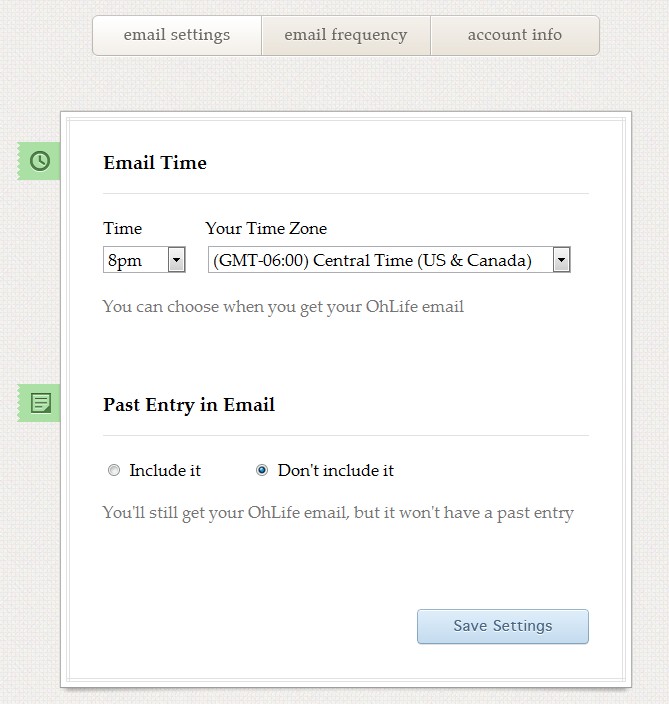
Have you ever had the intention of keeping a personal journal or diary, but never got around to it? It seems so tedious right? Well Ohlife is a free (my favourite word) on-line personal journal. They make the process easy. Just sign up for an account and set up your preferences. You can choose to have an email sent to you daily or weekly and even choose what the time of day. You also have the option to include your thoughts from the previous day.


When you receive the email simply reply with your thoughts and it will be saved directly to your account. You can even add one photo. Doesn't get much easier than that. This is a great way to record your thoughts, and keep track of things. If you choose the "Past Entry in Email" option, you could use it as a reminder. Just make sure you set the time for when you need it. New parents and mom's to be can keep track of all those special moments. Ohlife helps you put all your thoughts in one place. The most important thing Ohlife is private. They will not sell or share your information. OhLife Privacy Policy


 Ohlife was created by  Reman Child and Shawn Gupta. These are the same guys who created Expensr, a personal finance tool which was later acquired by Money Strands.  So they are no strangers to developing. In the future I would like to see an option to download your entries, and a mobile app would be nice for convenience.  So enjoy Ohlife, and no more excuses of why you can't get that journal started!


Blog Engage Blog Forum and Blogging Community, Free Blog Submissions and Blog Traffic, Blog Directory, Article Submissions, Blog Traffic

Friday, January 21, 2011

Save Money on Your Next Mobile Upgrade


Hey I'm back! Had to take a short sabbatical, sorry for the inconvenience. Today I want to hip you to getting the most out of your sell phone upgrade. You may also want to check out my previous post (Why you shouldn't go cheap on your next cell phone) I purchased the HTC Hero last March and became an instant Android fan. By September however I was running out of space because I'm an app junkie. So of course I looked to the next big thing the HTC Evo.

My anniversary date wasn't until January 1, 2011 which means I had to have a little bit of patients, but by waiting I would get $250 dollars off the phone. A $150 dollar instant discount (online) and $100 dollar mail in rebate. Not to mention Android 2.2 aka (Froyo) would be on the device by the time I got it. So now I've got a $450 dollar phone down to $200, and by ordering online Sprint waives the activation fee. Which brings me to the core points?

1. Be patient- Unless your phone is falling apart then wait it out. It will save you $$$ and technology changes so much something even better may be out by the time you're anniversary date rolls around.

2. Buy Online- It's ok to go in the store and checkout the phone in person, but make your purchases online because that's where you will get the most savings.

3. Save even more mone- Gazelle is a site that buys used electronics. After upgrading simply go to their site and enter the condition of your of your old phone. If your phone is worth something Gazelle will quote you on a price and give you a free shipping label. Once your device is received and inspected. Your check will be in the mail or you can get paid via Paypal. Selling your old phone can even further offset the cost of your new one. However, if your phone is not worth anything they will also ask you if you wish to recycle it.

4. Use YouTube- You can find out everything about the phone you're interested in, and how it performs in the real world. Plus find out the best apps and games to run on your prospective device.

5. Exception to rule- Sometimes BestBuy offers some blowout deals on new phones. So make sure you check them out in-store and online.

6. Discounts come at a price- If you're not happy with your current carrier then you may want to look at other options before you upgrade. Because most-likely you will have to extend your contract to get the low prices.

So remember be patient, and get the best and most for your money.