Monday, May 16, 2011

The Madden Corner Has Moved to Word Press


Hello everyone! I finally had time to make the jump from Blogger to Word Press. I will continue to make constant improvements to the new site so bare with me, but I look forward to bringing you more great content and added features. So please visit me at MaddenCorner.Com from now on, and thank you for your continued support.

Thursday, May 5, 2011

Cloudty Let's You Report the Weather


If you don't know I'm a weather forecaster. So I'm always looking for something cool in the world of weather. The other day I came across this cool web app named Cloudty. It's like Twitter except you report the current weather conditions. Cloudty gives you the option of sharing your location and sign up is simple with Twitter and Facebook integration. It can be used for anywhere in the world. If you have a home weather station this is a great way to put that information to use.  


Twitter user interaction is what makes it great, and I see Cloudty having that same kind of potential once more people get on board.   Cloudty can be accessed through your mobile browser and was created by Mario Trunz a web developer out of Ontario, Canada.  The site is only a few month old, and Mario says there more plans and improvements to come. Hopefully a mobile app is not far off and the ability to upload pictures. So give Cloudty a try and start reporting.  

Monday, May 2, 2011

What is the Cloud and Why it's Important to You


Cloud computing is a term that is being used more and more over the past year or two, but surprisingly many still don't know, or understand what term means. If you're unfamiliar with cloud computing I'll bet you'll be surprised that most-likely you use it every day. If you have a web based email account like Gmail or Yahoo then you're in the "cloud". Simply put cloud computing refers to any program that is not housed on your local computer.

Think of it as out-sourcing. Instead of using a program on your computer you're using a application online which gives you access to that information from anywhere and various devices. This is why online backup services like Carbonite and Mozy can be life savers. Having a backup drive for your computer is great idea and I highly recommend it, but most backup drives will not survive a fire or flood. So taking the extra step to back up your important information in the "cloud" is a valuable resource you should not overlook. You can also find some non-paid sources to backup or have access to our information from anywhere. (See Previous Post)


Another form of cloud computing I believe will even become more popular are virtual computers. Simply log into an account and get an entire operating system.  You have access to everything you would on a normal PC except it's all in an on line interface. To see one in action checkout EyeOS. It's currently in the early stages, but it will give you a feel for what a virtual desktop is like.

The Cloud is a very important part of our digital life and embracing it can help make your life a lot easier. Is there something in the world of technology you don't understand? Drop me a note and I'll answer your questions.


Wednesday, April 27, 2011

The PlayStation Disaster and What you should Do


For the second time in the past few weeks millions of Americans personal information has been compromised by hackers. Now the hack attack on PlayStation Network has affected over 70 million people worldwide and has caused the service to be shut down for more than a week now. If you don't play online games or download movies to your PS3 then you have nothing to worry about, but for those of us that do what to do next?


You will need to change all of your account information as soon as the PSN network comes back online, but before that follow my guide on how to "Life Lock" your credit. Next I recommend using Yahoo Mail Plus to thwart off future events. It's around $20 dollars per year, but for that you get disposable email address along with a few other nice features. You simply create a prefix-suffix for your address (ex:maddencorner-blogs@yahoo.com, maddencorner-accounts@yahoo.com, maddencorner-test@yahoo.com).

The prefix will remain the same, but you can make up to 500 separate suffixes. These messages are still delivered to your in-box, and it keeps you from handing out your primary address. If the address ever becomes compromised create a new suffix for the effected account and delete the old address. I know there are plenty of tips and tricks out there, but I've tried most of them and I find this one the most effective.

The next great feature from the Yahoo's Mail Plus service is the ability to receive your email messages through POP access or mail forwarding. That way if you use another email program or client you can forward all of your Yahoo messages to your primary email address and create a filter/sub-folder for the Yahoo messages so they don't clutter up your inbox.

Have you been caught by the recent data breaches? I have, but I'm not worried. We live in a digital world and sometimes these things will happen, but don't let it deter you from getting on-line.

Tuesday, April 26, 2011

Get A Paid Android App Free Everyday


Did the word free grab your attention? Well it did if for me. A few months ago Amazon announced that they were coming out with an app store and I pretty much ignored it, my mistake. If you're an Android fan you may already be using AppBrain or another 3rd party application site, but Amazon have set themselves apart in a big way. They're giving away a FREE paid app every day! Which if you're an app junkie then you can't pass that up. First you will need to have an Amazon account and credit card on file if you don't already. They want charge you, but you will get an email saying you have been billed $0.00 for your current purchase.


Before downloading the Amazon App Store you will need to make a change on your phone. Go to Menu-Settings-Application and then check allow "Unknown Sources" box. Next go to the Amazon App Store and enter your phone number in the upper right corner. You will receive a text to download the app store. After the app has downloaded and installed simply enter in your Amazon username and password and you're good to go.


Amazon gives out one free paid app every 24 hours. Even if it's an app you're not interested in download it anyway. Because once you download an app it will remain in your Amazon app account even if you deleted if from your phone. That way if you change your mind you want have to pay for it later. How do you manage your android apps? Are you already using the Amazon App Store?

Sunday, April 17, 2011

The Blog Engage 500 USD Guest Blogging Contest #2 of 4


Normally I liked to keep you informed about technology, but today I'm dropping a note about the Blog Engage $500 USD Guest Blogging Contest. Blogengage is a great community for any new or established blogger to further your reach within your niche. I've been a part of this community for a few years now and I've met a lot of really great bloggers. Brian Belfitt is the founder of Blogengage. He has continually done an excellent job of keeping the community moving forward and improving the quality of the site overall. Now here are the details for the contest.

Start Date

April 16 2011

End date

May 31 2011

Contest Rules

In order to qualify for our contest you must write an article about the blog engage contest and it’s sponsors on your blog ASAP! The sooner you write the article about our contest and sponsors the more bonus points you get.
If you write about the contest and sponsors article in April you will get 300 Bonus points. If you write about the contest and sponsors article in May you will get 150 Bonus points.

Special 1000 USD Note

By entering into our contest your guest article is automatically entered into a chance to win the the1000 USD to the best guest blogger of 2011 contest
Dec 01 2011 I will allow all our guest bloggers that have submitted contest articles to pick the one article they want to use towards The Best of the Guest Blogger Year End 2011 Contest. These articles will be judged and the winner, the blogger who has the best article in 2011 will be awarded 1000 USD.

Contest prizes

First place 250 USD
Second Place 150 USD
Third place 100 USD

How to Win?

To win the contest you must get as many points as possible by tweeting, engaging here at blog engage, Linkin in votes, facebook likes, comments and sponsor reviews.
Tweets, 1 point up to a max of 250 points
Linked In Votes, 1 point, up to a max of 500 points
Facebook Likes, 1 point, up to a max of 500 points
Engages at Blog Engage, 2 points, Unlimited points
Comments that provide value, 2 points Unlimited Points
Sponsor Reviews, 10 points per review. max points based on unique content

Links to our contest sponsors


Ana Hoffman from Internet Marketing Tools
Kimberly Castleberry from WordPress and Facebook Marketing
Justin Germino from justingermino.com
Amogh from The Funky Chunk
Don Power from sproutsocial.com
Kavita from SFIhomebizz.com
Latief from Simple Blogging Tips
Sheila Atwood from newbielifeline
Matt Conlon from Matt Conlon.com
Aswani from aksindiblog.com
Kharim from Free Blogging Tips
A. Tatum from maddencorner
Tuan from Technology News
Omer Greenwald from webtechwis
Aybi from social media for business
janwong from janwong.my
Robert Bravery from integralwebsolutions
RowenaBolo from AsianMarketer
Ileane from basicpodcastingtips
David Leonhardt from SEO consultant
tonyknuckles from 113tidbits
Cosmin Stefan from themilliontwister
Joyce Oladipo from joyceoladipo
Jon from Essex Portal
Jon from jonalford
Mavis Nong from attractionmarketingonline
Dahlia Valentine from That Internet Marketing Thing
Jan Rossi from getyoustartedemarketing
Janet from The Natural Networker
Dennis Edell from Direct Sales Marketing
Vijayraj Reddy from Make Money Online
Alex from Jocuri from jocurile
Tony Hastings from thetop10blog
Neeraj Rawat from expertsgalaxy
Kristi from Blog Marketing
Mani Viswanathan from DailyBlogging
Alex from make money with amazon
Estava Morioka from estavamorioka
Shiva from Webmaster Tips
Robert Dempsey from Internet Marketing Strategies
kbharath from Techntricksonline
Steve from Lifestyle Design
ndreas from Online Advertising
Saket Jajodia from SJbn.Co
Bican Valeriu from smarketools
Wong Chendong aka The Bad Blogger
Nishadha from Make Money Blogging
Dave Grimes II from thesisready
Devesh from Blogging Tips
Matthew from Home Based Internet Businesses
Paul Salmon from Technically Easy
kirapermunian from geekster online
John Paul from Blog Resources
John from Hypertransitory.com
Michael Aulia from CravingTech.com
Daniel Snyder from fireproof safes for data
Deepak from Lead Generation
Nicholas Wind IMer from cashflowduplication
Sarah Lam from writingconsultation
Catarina Alexon from catarinasworld
MtnJimFisher from outsourcing
Peppy from The PeppyWrites Chronicles
Felix Albutra from Blogging Access
Gloson from social media and blogging tips
sajeev kumar menon from sajeevkmenon
Argie Monroy from Live Life More
Andrew Williams from The Billionaire's Butler
Memoirs of a Single Dad from Memoirs of a Single Dad
Gera from SweetsFoodsBlog
Togrul from Income Streams
Jennifer from emptypockets01
ptaylor98 from ptaylor98.jottit
Doc Sheldon from docsheldon.com
Goran from Black Hat Source
Ninure from Ninure da Hippie's Blog
Christine from christine.biz
Sarah from templatefaerie
Alison Moore Smith from Affordable Web Design for Small Business
Dave Lucas from dave-lucas.blogspot.com
Sean Supplee from Seansupplee.com
DazzlinDonna from making a living online
Pablo Lara H from pablolarah.cl
Tia Peterson from bizchickblogs.com
Dr. Rus Jeffrey from General Sarge
Sietse from allyouneedislists.com
Blazing Minds from Blazing Minds
Typhoon from make Money Online
Kiesha from WeBlogBetter
Bryan Hollis from News for Bloggers
Harleena Singh from FreelanceWriter.Co
Tristan from Blogging tips
Andi from misadventureswithandi.com
Dr. Hansjörg Leichsenring from der-bank-blog.de
Big Cajun Man from canajunfinances.com
Imran from shariffdotorg
Melinda from findingthehumor.com
Martha Giffen from marthagiffen.com
Dani Nir-McGrath from danimcgrath.com
Pit from pureinfotech.com
TS Redmond Mize from Element Content
Raj Agrawal from Upcoming Technology
Ryan Hanley from Albany Insurance
Kev From kevsproreviews.blogspot.com
Dana from Cell Phone Reviews
Michele Welch from new biz blogger
Josh Thompson from Boom Serve
Ryan Biddulph from Home Based Success
Fletcher T. from emailfletcher.blogspot.com
Jimi Jones from Jimi Jones
Dwight from FinanciallyEliteBlog.com

Friday, April 1, 2011

Madden Corner Giveaway! Show Me Your Desktop!

So what does your desktop look like? Are a neat freak, or do you keep things all over the place. Me personally I like the minimalist approach, but with all the functionality. (video below) It's simple and clean. I took the back ground photo last year on a flight to Texas. 


By day I'm a weather forecaster so it's hard to pass up a good sky shot. The bar at the top is Nexus and it has plenty of options for customization.  The clock is from Rain Meter and it offers a lot of widgets and it keeps memory usage to a minimum. Now its time to show me yours. The winner will get $30 bucks just for showing me their desktop. How easy is that?

Now for the rules. To enter you get 1 point for doing these two things

Like my Facebook fan page and upload a picture or short video of your desktop.
Retweet this post and leave your tweet link with your comment here on the Madden Corner.

Get a bonus point for doing either of these things.

Subscribe to my RSS Feed.
Or Following me on Twitter.

Each point equals one vote. Each contestant can recieve a maxium of two votes if the bonus item is completed. Votes will be add for each contestant and the winner will be randomly selected on Thursday April 14th 2011 and announced Friday April 15th 2011. Winner will be contacted through his/her entry methods. The Madden Corner reserves the right to void any enter for not following the rules or any other reason deemed necessary. If any entry is voided another winner will be selected and notified immediately. Winner will be paid through Paypal within 5 days of notification. Entering contest means you agree to all the terms listed above. For any questions please use the contact tab at the top of this page and thank you for your participation. 


Monday, March 7, 2011

My top 10 list: What is YouTube Really Good For?


I think a lot of non-techie people subconsciously have this question. What is YouTube really good for? Your first thought is probably viral video's and people doing things they really shouldn't. Now don't get me wrong this is true, but YouTube is way more than a comedy site. It's a collection of things from A-Z and from people all over the world. You can find information on everything and anything. Maybe your having a car problem? There is a video's for that! Regardless of your need I'm positive you can find help on YouTube. So today I compiled a list of things for you to consider.

These are just a few things YouTube can be of used for. So tell me, how do you use YouTube?


10. Movie/Game Trailers - See the latest film/game trailers in HD.

09. Music - Just about every artist has a YouTube channel. You can also find a lot of DJ's and everyday Joe's that will upload their own mixes of a track or just the song in general. YouTube is the place young people are going for music. Because with tools like YouTube MP3 you can download the song right from the video. 

08. Car Shopping - You will find major car companies and even your local dealers may have a YT channel. Also find personal and professional reviews. Checkout Kelly Blue Book

07. Car Repair- Last year one of my headlights when out on my SUV and I was told it would be $87 to replace it. Needless to say I wasn't paying that much to replace a headlight, but my owner's manual gave no instructions on how to take my front grill apart. So a quick trip to YT and I found a detail video on how to get the job done. I watched the video from my cell phone making that much easier to follow the instructions.

06 Cell Phone Shopping- The first thing I do before I buy a new phone is to checkout all the reviews on YouTube. Sites like Phone Dog and Phone Scoop get to test the phones before they hit market. You can get the pros and cons ahead of time.

05. Cooking Instructions - Not that great in the kitchen? You can find a wealth of recipes and tips.

04. Sports/Workout - Need to get back in shape? Or maybe you have a child or grandchild that needs some instruction in a sport.

03. Computer Tips/Upgrade - Another great source on how to help fix a problems that arises, or learn how to upgrade your memory. (Madden Corner Tip)

02. Home Improvement- Checkout Lowe's and Home Depot both provide you with tips to get the job done. You can find video's to tackle just about any project.

01. The Viral Video- The viral video has made people like Antoine Dodson famous overnight. However it's not all about the laughs. YouTube allows you to become and I-reporter and with mobile technology you can upload video's from anywhere. It gives the average person the ability to tell their story and viewers the chance to see a personal prospective on local and world events. YouTube was one of the top tools use by the people of Eygpt during the recent crisis there. 

Friday, February 25, 2011

Mobile Security


The last few weeks I've covered how to protect yourself in various areas of your digital life. I decided to close this out by covering one of the biggest security risk that most of us have; the mobile phone. Our mobile devices have become such an intricate part of our lives and they contain a ton of personal information. 


Now just imagine if you lost your device? Or even worse your device has been compromised by a malicious app. This is why mobile phone security has become just as important as your personal computer. So today I have covered three apps. Two of the three will cost you, and the third you can upgrade for premium features.


Wavesecure came on the scene early last year and a few months ago was acquired by McAfee. It allows you to do everything from scheduling backups to locating your device. You can get a 7 day free trial and it will cost you $19.90/yr.

Lookout Mobile shares some of the same features as Wavesecure except it scans every app you download to make sure none are malicious, it tells you the permissions for every app, and what information each app may send out. It cost $2.99/m or 29.99/yr.

iHound has been around for a while and I first wrote about it in 2008. It's also the only one of the three that works on Apple products and now iHound offers warranties on your device as well. Their current warranty sale is $99 for two years ($11 bucks off the normal price). App prices seem to differ between Android and Apple. Android is on sale right now for $3.99/yr. Below is a chart covering each of the apps features. One correction to the chart below. Blackberry is not available for iHound yet.

Besides backing up your mobile device the most important feature of all three is locating your device if missing, erasing the device if lost, and turning up the volume if your phone is on vibrate/silent if misplaced. I currently use all three programs. Because I'm an app junkie :-) , and it doesn't hurt to have extra protection. So tell me, how are you protecting your device? Don't have a high-end phone yet? Checkout my previous post on "Why You Shouldn't Go Cheap On Your Next Cell Phone" and "Save Money on Your Next Mobile Upgrade"


Blog Engage Blog Forum and Blogging Community, Free Blog Submissions and Blog Traffic, Blog Directory, Article Submissions, Blog Traffic

Friday, February 18, 2011

Are Your Search Results Protected?


Over the last two weeks I've talked about the importance of backing up your memories and locking down your credit. Both topics deal with protecting those things that are personal to you. So today's focus is on protecting your search results. In a digital world you would be amazed at the amount of information someone could compile off of your internet habits. Your search results could tell a story that would revival the work of an FBI profiler. I know you may think I have nothing to hide, but that doesn't mean your online life has to be an open book.

This is where StartPage comes in. StartPage is provided by Ixquick (overseas version) and it allows you to search the internet in total anonymity. They do not record your IP address, use cookies or track your searches, and they're the first search engine to do so. If you're not familiar with IP addresses to a computer it's just like your phone number showing up on a caller ID. Most search engines record all this information so they can target you with advertising and other things, but most importantly all this information is stored on their computers. This puts your personal life in the hands of others.

StartPage saves you time by searching the most popular search engines simultaneously and anonymously. They provide more comprehensive search results, advanced searches (Boolean logic, phrases, wildcards, and field searches) and global Internet searches providing you with business listings in the StartPage Phonebook. StartPage uses a star ranking system from 1-5 and  search result honing to help pinpoint the search results you want with either a check mark or an x. After finding a search term in StartPage you will have the option of going to the page directly, or using their proxy button underneath the results. This adds another layer of protection to your privacy.


To back all of this up StartPage was the first to receive European Privacy Seal Award in 2008 certifying their promise to protect their users privacy. So if you're serious about security and your personal information give StartPage a try. A big thanks to Dr. Katherine Albrecht U.S Contact for StartPage and a respected security advocate for allowing me to use the StartPage logo. When it comes to security remember it's better to be proactive than reactive.

Friday, February 11, 2011

DIY "Life Lock" Your Credit


If you watch TV I'm sure you've seen the Life Lock ads with the CEO publicly displaying his Social Security number for the world to see. Well even he had his identity stolen (13 times), but that doesn't have to be you. Credit monitoring is great, but in reality it is really not enough. What you should consider is locking your credit. Even if you don't believe your credit is worthy of locking down it's something you should give serious thought to. With bad credit someone could still open those small accounts like cell phones and utilities, or even worse just outright assume your identity and commit crimes in your name.


Every credit agency in the United States allows you to freeze your credit, and all this can be accomplished on-line. Freezing your credit prevents anyone from fraudulently using it, and if you need to apply for something it requires you to unfreeze it. Once frozen your credit can only be pulled by your existing accounts or credit collection agencies acting on the behalf of a company with your account. To freeze your credit your will have to fill out the necessary forms with each of the three reporting agencies Trans Union, Experian and Equifax (links at the bottom). It's necessary to do it with all three because credit agencies are not linked and what may show on one report may not show on another.

On average it will cost you anywhere from $20-$60 dollars to lock down your report at all three agencies (prices vary by state), That's a small price compared to the monthly fees most companies charge for monitoring your credit, and if someone tried to misuse your name by charging thousands of dollars.  Freezing your credit is the most effective way of protecting yourself because simply adding a statement or an alert to your credit profile isn't enough because computers don't look at these statements. For overseas users credit standards vary by country because of the different laws in each, but there is one more thing that anyone can do. 

I would recommend getting a Google Voice number and adding that number to your credit profile (or Skype number if outside the United States) and use this number when applying for credit. With Google Voice or Skype you can receive email messages saying you have a voice mail, but also with GV you can receive a text message too. And with both services you can forward calls to more than one phone. Fast notification is the most important thing if someone is trying rip you off. For more on Google Voice checkout my guest post at Infocarnivore and my past post on Skype. Remember its better to be proactive than reactive.


Friday, February 4, 2011

Time to Safeguard Those Memories


A few days ago I was reading the 24/7MoM via Blogengage and Heather was discussing her resent misfortune of a fire starting in her apartment building. She received water and smoke damage, which caused some damage to her computer. Now she's trying to see if it can be saved. Living in a digital age is great, but with so many of our memories today on a computer it can make you vulnerable to loss due to fire, viruses or hard drive failure. So today I want to remind you the importance of backing up your information, especially pictures! A lot of things can be replaced, but you can't replace the memories of your life and loved ones. But it's not just about backing up your data. If you have time scan the photos you don't have in digital form. This way if the unthinkable happens your prepared. If you don't have a scanner just go to Walmart and use their machine, or any drug store.

Now the next thing is accomplishing the task. Backup hard drive prices have really fallen in the past two years. Making it easy to store all your data. With the situation that happened to Heather however, unless you keep your backup drive in a safety deposit box it want do you any good if your house or apartment burns to the ground. I do recommend having one, just don't rely on it as your sole option. Below I've listed a few services I use that give you free storage up to a certain amount, but also have paid plans with reasonable prices. Storing your data securely off site is a must have in the digital age. So take some time this weekend to save the things that matter most. Remember its always better to be proactive, than reactive.


Dropbox 2GB Free (See previous post on uses for Dropbox)

Windows SkyDrive 25GB Free

ZumoDrive 2GB Free

IDrive 5GB Free

Friday, January 28, 2011

Personal Journaling made Easy with Ohlife


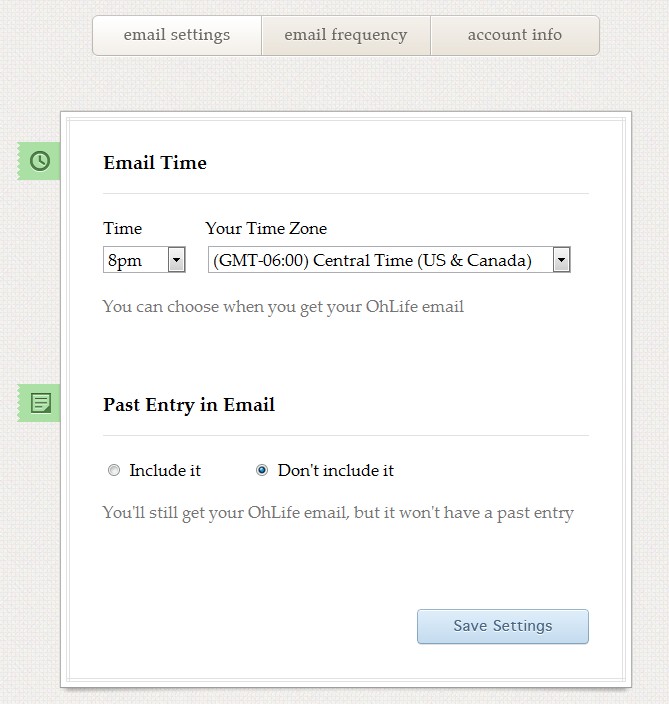
Have you ever had the intention of keeping a personal journal or diary, but never got around to it? It seems so tedious right? Well Ohlife is a free (my favourite word) on-line personal journal. They make the process easy. Just sign up for an account and set up your preferences. You can choose to have an email sent to you daily or weekly and even choose what the time of day. You also have the option to include your thoughts from the previous day.


When you receive the email simply reply with your thoughts and it will be saved directly to your account. You can even add one photo. Doesn't get much easier than that. This is a great way to record your thoughts, and keep track of things. If you choose the "Past Entry in Email" option, you could use it as a reminder. Just make sure you set the time for when you need it. New parents and mom's to be can keep track of all those special moments. Ohlife helps you put all your thoughts in one place. The most important thing Ohlife is private. They will not sell or share your information. OhLife Privacy Policy


 Ohlife was created by  Reman Child and Shawn Gupta. These are the same guys who created Expensr, a personal finance tool which was later acquired by Money Strands.  So they are no strangers to developing. In the future I would like to see an option to download your entries, and a mobile app would be nice for convenience.  So enjoy Ohlife, and no more excuses of why you can't get that journal started!


Blog Engage Blog Forum and Blogging Community, Free Blog Submissions and Blog Traffic, Blog Directory, Article Submissions, Blog Traffic

Friday, January 21, 2011

Save Money on Your Next Mobile Upgrade


Hey I'm back! Had to take a short sabbatical, sorry for the inconvenience. Today I want to hip you to getting the most out of your sell phone upgrade. You may also want to check out my previous post (Why you shouldn't go cheap on your next cell phone) I purchased the HTC Hero last March and became an instant Android fan. By September however I was running out of space because I'm an app junkie. So of course I looked to the next big thing the HTC Evo.

My anniversary date wasn't until January 1, 2011 which means I had to have a little bit of patients, but by waiting I would get $250 dollars off the phone. A $150 dollar instant discount (online) and $100 dollar mail in rebate. Not to mention Android 2.2 aka (Froyo) would be on the device by the time I got it. So now I've got a $450 dollar phone down to $200, and by ordering online Sprint waives the activation fee. Which brings me to the core points?

1. Be patient- Unless your phone is falling apart then wait it out. It will save you $$$ and technology changes so much something even better may be out by the time you're anniversary date rolls around.

2. Buy Online- It's ok to go in the store and checkout the phone in person, but make your purchases online because that's where you will get the most savings.

3. Save even more mone- Gazelle is a site that buys used electronics. After upgrading simply go to their site and enter the condition of your of your old phone. If your phone is worth something Gazelle will quote you on a price and give you a free shipping label. Once your device is received and inspected. Your check will be in the mail or you can get paid via Paypal. Selling your old phone can even further offset the cost of your new one. However, if your phone is not worth anything they will also ask you if you wish to recycle it.

4. Use YouTube- You can find out everything about the phone you're interested in, and how it performs in the real world. Plus find out the best apps and games to run on your prospective device.

5. Exception to rule- Sometimes BestBuy offers some blowout deals on new phones. So make sure you check them out in-store and online.

6. Discounts come at a price- If you're not happy with your current carrier then you may want to look at other options before you upgrade. Because most-likely you will have to extend your contract to get the low prices.

So remember be patient, and get the best and most for your money.

Monday, November 22, 2010

Let's Crate- Online Storage

Let's Crate is a new Online Storage website currently in the Beta stage created by Sahil Lavingia. Crate gives you 200MB of free storage and is simple to use. Just create a "Crate" to put your files in. Then click on the Crate and drag and drop your files for upload. 200mb may not seem like a lot, but that's good enough to do a few things with and since the storage site Drop.io is going out of business after being purchased by Facebook, Crate has a real opportunity to fill a void for a service a lot of people enjoyed including yours truly. Crate is by invite only, but the Madden Corner has you covered. Just use the invite code "maddencorner10" and your good to go. Help Let's Crate out by offering suggestions for improvements on the left hand side of the page, and as always don't forget to stop by my Facebook fan page.


Blog Engage Blog Forum and Blogging Community, Free Blog Submissions and Blog Traffic, Blog Directory, Article Submissions, Blog Traffic

Tuesday, November 16, 2010

Personalize Your Blog or Amazon Store


Blog branding is one of the first things you must consider when creating a blog. One of the first tools I became associate with was GDI. GDI is a company that owns the .WS domain name. I initially used it because the domain names I own now were not available at the time. I also like the fact that I was able to get 10 personalized email address (example@maddencorner.ws) and setup my own website for my Amazon Store. I use the email addresses for this blog and for my children. Since I am the administrator of the account it made it easy for me to monitor what kind of emails they receive. So really it provided me with what I need for my blog, but also a little peace of mind when my little girls asked daddy for their own email addresses.

Now if your not that technical don't worry setup is easy with the custom templates provided. GDI charges $10 a month, but gives you a 7 day free trail just to checkout all the services offered. So if you don't like, don't keep it. I've been using the service for about two years now and I have no complaints. Even if you don't blog you can use the custom web templates and email addresses for your small business or anything else you can think of. GDI is also presented as a way to earn passive income. So if you need a simple and quick way to personalize your blogging GDI can meet your needs.

For all the details click here.

Monday, November 15, 2010

Why Facebook Email Will Not be a Gmail Killer


A lot of buzz over the past 24 hours has been in the air about Facebook offering a new email service. While innovation is always exciting it doesn't necessarily mean people are going to jump ship and change the way they communicate. Nielsen 2009 report on "Global Faces and Network Places" showed that from December of 2007 to December of 2008 internet usage was up 18% globally, however among 'Member Communities' it rose by 63% and Facebook saw an enormous increase of 566% (3.1 billion minutes spent online to 20.5 billion). This was the highest amongst the 75 most popular brands online worldwide.

Facebook has 500 million members and is constantly growing. To contact anyone on your Facebook friends list you simply go to messages and type their name (no email address required). Several recent surveys show that most people under 18 prefer Facebook and SMS as their primary means of communication over email. With that being said Facebook's new email offer maybe exciting, but there is no reason as of yet to believe that it will overtake Gmail and the number integrated services it already offers.

Friday, November 12, 2010

Data Plans: How much Data do You Need?


Recently I was looking at data plans because I'm thinking of buying the new Samsung Galaxy Tab from Sprint and was wondering how much is 2GB or 5GB of data a month. I know everyone's usage is different, and there has to be an easy way to figure these things out. That's when I came across a nice sliding scale from AT&T. Since where talking about data the company is irrelevant, but the scale works great and can give you a good idea on what the right plan is for you. I figured with a combination of the data plan and using wifi at home 2GB would do me just fine. Do any of you already have a data plan? Let me know what you think and what company you use.

Blog Engage Blog Forum and Blogging Community, Free Blog Submissions and Blog Traffic, Blog Directory, Article Submissions, Blog Traffic

Wednesday, November 3, 2010

Increase Productivity Part 2

Last week I explained how USPS really can save you time and money. This week I'm tackling the opposite end of the spectrum. What to do when receiving an order and your not at home. This is really important if you live in an apartment or maybe your neighborhood is a high traffic area. Leaving your precious valuables outside your door for a number of hours could be a huge risk, but I have 3 ways to tackle the issues. First anytime I ordered something that comes via UPS or Fedex and I know I can't be home I simply require a signature to receive the item. That way the delivery person will leave you a note and ask for the best time to reschedule the delivery, or you can go to the shipping facility and pick it up yourself.

Second for general mail delivery when you can't be home or your out of town simply go to the USPS website and fill out a Mail Hold Request. They will hold your mail anywhere from 3 to 30 days, make request up to 14 days in advanced, and your mail service will resume on the date you select.

Third I discovered a service called Kinek. The video below gives a great break down of the service and how it can save you time and provide peace of mind. I hope your found this series helpful and don't forget to join the Madden Corner on Facebook and Twitter.